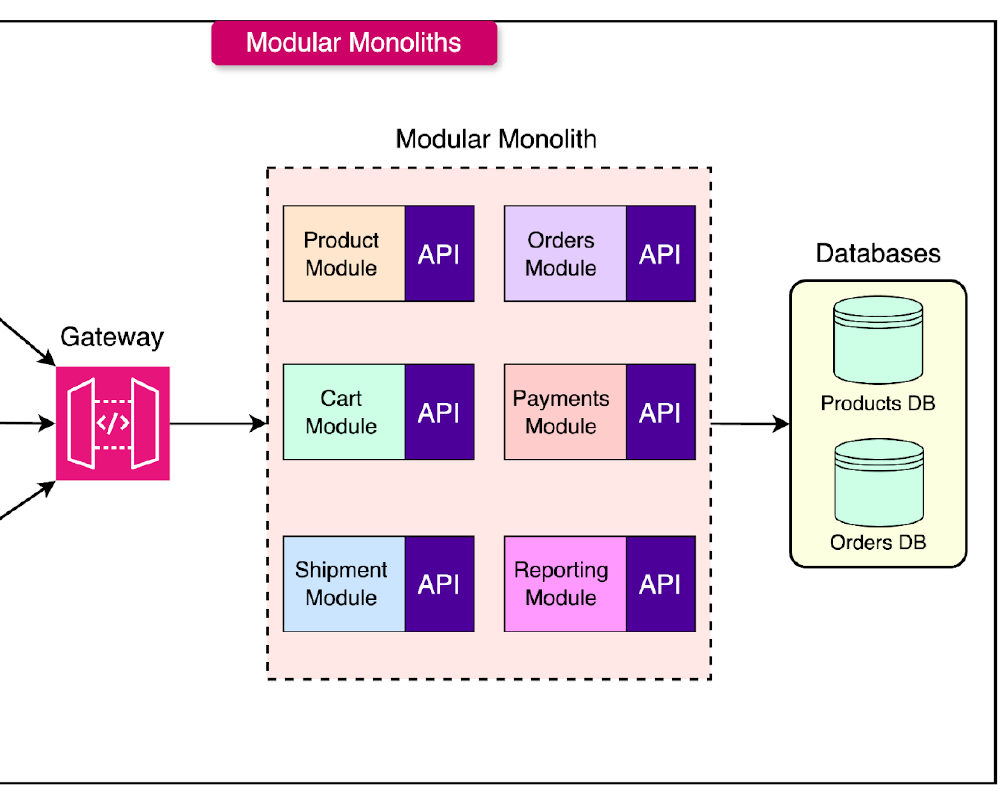
What is Modular Monolith and Why It’s an Interesting Alternative
Modular Monolith is a software architecture that combines the benefits of Monolith and Microservices by organizing code into modules with clear bounded contexts while maintaining single deployment unit.
Problems with Traditional Monolith
Traditional Monolith often suffers from:
- Tightly Coupled Code: All parts are tightly bound, making changes difficult
- Single Point of Failure: If one part fails, the entire system fails
- Technology Lock-in: Must use the same technology stack throughout
- Difficult to Scale: Cannot scale specific parts independently
Problems with Microservices
While Microservices solve many monolith problems, they introduce additional complexity:
- Distributed System Complexity: Complexity of distributed systems
- Network Latency: Delays from network communication
- Data Consistency: Data consistency challenges
- Operational Overhead: Requires strong DevOps teams
- Development Complexity: Complexity in development and debugging
Modular Monolith: A Balanced Solution
Modular Monolith offers a balanced approach:
✅ Benefits:
- Modularity: Clear module separation by business domain
- Loose Coupling: Modules communicate through defined interfaces
- Single Deployment: Easy to deploy and maintain
- Easier Testing: Easier to test than distributed systems
- Gradual Migration: Can be extracted to microservices in the future
⚠️ Considerations:
- Technology Constraint: Still limited by primary technology
- Shared Database: May have data coupling issues
- Resource Scaling: Cannot scale individual modules separately
Architecture of Modular Monolith E-commerce Application
I created a Modular Monolith E-commerce Application using C# and ASP.NET Core to demonstrate the application of these principles in real system development.
🏗️ Architecture Overview
ECommerceApp/
├── src/
│   ├── ECommerceApp/                    # Main Web API Application
│   │   ├── Controllers/                 # API Controllers
│   │   ├── Program.cs                   # Application entry point
│   │   └── ECommerceApp.csproj
│   ├── ECommerceApp.Shared/             # Shared Kernel
│   │   ├── Events/                      # Domain Events
│   │   ├── Kernel/                      # Base entities, interfaces
│   │   └── ECommerceApp.Shared.csproj
│   └── Modules/
│       ├── Orders/                      # Orders Module
│       │   ├── Application/             # Use cases, commands, queries
│       │   ├── Domain/                  # Domain entities, events
│       │   ├── Infrastructure/          # Data access, repositories
│       │   ├── OrdersModule.cs          # Module registration
│       │   └── ECommerceApp.Modules.Orders.csproj
│       ├── Products/                    # Products Module
│       │   ├── Application/
│       │   ├── Domain/
│       │   ├── Infrastructure/
│       │   ├── ProductsModule.cs
│       │   └── ECommerceApp.Modules.Products.csproj
│       └── Customers/                   # Customers Module
│           ├── Domain/
│           ├── Infrastructure/
│           ├── CustomersModule.cs
│           └── ECommerceApp.Modules.Customers.csproj
🎯 Key Principles of Modular Monolith
1. Modules Each module represents a distinct business capability such as Orders, Products, Customers
2. Encapsulation Modules hide internal details and expose only necessary functionality through interfaces
3. Shared Kernel Common functionality such as base entities, common utilities, domain events
4. Communication Modules communicate through interfaces or domain events, avoiding direct dependencies
5. Single Deployment All modules are deployed together as a single unit
Getting Started
Prerequisites
- .NET 8.0 SDK
- Visual Studio Code or Visual Studio
Quick Start
1. Clone Repository:
git clone https://github.com/suriyasonp/modular-monolith-ecommerce.git
cd modular-monolith-ecommerce
2. Run Application:
# Method 1: Using script (Recommended)
./run.sh

# Method 2: Manual run
dotnet build
dotnet run --project src/ECommerceApp/ECommerceApp.csproj
3. Access API:
- Swagger UI: http://localhost:5000/swagger/index.html
- API Base URL: http://localhost:5000/api
- Sample Products: Data will be automatically seeded on startup
Testing the Application
Quick Test Script:
./test-api.sh
Key API Endpoints
Products API
GET /api/products- Get all productsGET /api/products/{id}- Get product by IDPOST /api/products- Create new productPUT /api/products/{id}/price- Update product pricePUT /api/products/{id}/stock- Update product stock
Customers API
GET /api/customers- Get all customersGET /api/customers/{id}- Get customer by IDPOST /api/customers- Create new customer
Orders API
GET /api/orders- Get all ordersGET /api/orders/{id}- Get order by IDGET /api/orders/customer/{customerId}- Get orders by customerPOST /api/orders- Create new orderPOST /api/orders/{id}/confirm- Confirm orderPOST /api/orders/{id}/ship- Ship orderPOST /api/orders/{id}/deliver- Deliver order
Benefits and Drawbacks of Modular Monolith
✅ Benefits
1. Deployment Simplicity
- Deploy as single unit, reducing infrastructure complexity
- No need to worry about service discovery or load balancing
- Easy rollbacks
2. Performance
- No network latency between modules
- Communication is in-process calls
- Cross-module transactions are straightforward
3. Development and Debugging
- Easier to debug than distributed systems
- Better IDE support
- Simpler end-to-end testing
4. Operational Costs
- Lower infrastructure requirements
- No need for large DevOps teams
- Simpler monitoring and logging
5. Future Flexibility
- Can be extracted to microservices when necessary
- Well-designed modules are easily extractable
⚠️ Drawbacks
1. Technology Constraints
- Must use the same primary technology
- Difficult to use different tech stacks
2. Scaling
- Cannot scale individual modules separately
- Resource utilization may not be optimal
3. Database Coupling
- Shared database may create coupling issues
- Schema migrations need careful consideration
4. Team Independence
- Teams still need to coordinate deployments
- Shared codebase may be problematic for large teams
When to Use Modular Monolith
🎯 Suitable for
1. Small to Medium Teams (2-20 people)
- Limited resources for infrastructure complexity
- Need high development velocity
2. New Applications
- Uncertain about domain boundaries
- Need rapid prototyping and iteration
3. Unclear Requirements
- Business requirements change frequently
- Need flexibility for adjustments
4. Limited DevOps Capability
- Team not ready for distributed systems
- Infrastructure automation not mature
🚫 Not Suitable for
1. Large Organizations with Many Teams
- Teams need high independence
- Different release cycles
2. Very Different Requirements
- Different scalability requirements per module
- Need different technologies
3. High Compliance and Security Constraints
- Need isolation between components
- Strict regulatory requirements
Migration Path Planning
Phase 1: Start with Modular Monolith
Traditional Monolith → Modular Monolith
Activities:
- Identify domain boundaries
- Create modules by business capabilities
- Implement interfaces for inter-module communication
- Add domain events infrastructure
Phase 2: Improve Module Independence
Tightly Coupled Modules → Loosely Coupled Modules
Activities:
- Separate databases per module
- Use event-driven communication
- Implement distributed tracing
- Add per-module monitoring
Phase 3: Selective Microservices Extraction
Modular Monolith → Hybrid Architecture
Activities:
- Identify modules suitable for extraction
- Extract modules with different scaling needs
- Implement API gateways
- Setup service mesh
Conclusion
Modular Monolith is a suitable architecture for many types of organizations, especially teams that want the benefits of modularity but are not ready for the complexity of microservices.
🔑 Key Takeaways
1. Start Simple
- Use Modular Monolith as starting point
- Focus on domain modeling and clean boundaries
- Improve gradually
2. Design for Change
- Use interfaces for inter-module communication
- Implement domain events infrastructure
- Prepare monitoring and observability
3. Plan Migration Path
- Identify modules that may need extraction in the future
- Design data access patterns that support separation
- Build culture of modular thinking
4. Focus on Business Value
- Don’t let technical complexity overshadow business goals
- Use architecture appropriate for team and context
- Remember: Architecture is means, not end
🚀 Next Steps
- Study the Code: Visit the repository to understand implementation details
- Try Running: Execute
./test-api.shto see all functionality - Add Features: Try creating new modules following established patterns
- Apply to Production: Adapt for production environment
Modular Monolith is not a silver bullet, but it’s an effective tool for building maintainable, scalable, and evolvable systems in the long term.
References
- Modular Monolith E-commerce Repository - Implementation Example
- Domain-Driven Design - Eric Evans
- Modular Monoliths - Kamil Grzybek
- Building Microservices - Sam Newman
- Clean Architecture - Robert C. Martin
- ASP.NET Core Documentation - Microsoft Docs
- Monolith vs Microservices vs Modular Monoliths - Monolith vs Microservices vs Modular Monoliths